There have been some new security developments in Google Chrome recently. The latest browser releases can't load local files using asynchronous requests when testing published webrotate templates locally on your computer (i.e when they are not loaded from the Internet or your local webserver). We rely on these asynchronous requests (AJAX) in our 3D product viewer to load viewer configuration (xml) files.
Note that all works fine if the viewer is loaded from the Internet or your local webserver (e.g localhost / 127.0.0.1).
Good news is that Chrome has a special key that Google gives web developers and testers to bypass this security check and it's very simple to apply to your Chrome also.
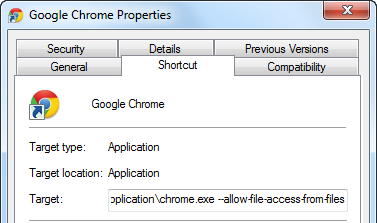
If you are on Windows, go to your desktop and find Chrome shortcut. Make a copy of the shortcut for your webrotate tests and right-mouse click on it to bring up the shortcut properties. You will see that there's a Target field on the shortcut properties form, so just add the following to the end of the target path right after the closing quote (add a whitespace as well):
--allow-file-access-from-files
Mine for example looks like this: "C:\Users\...\chrome.exe" --allow-file-access-from-files
It's more involved on Mac and we haven't tried it there yet but you can see how it can be done in this post.
Sept 2014 - Note that when you launch your local previews in Chrome from inside WebRotate 360 SpotEditor (v3.5 and up, Windows version), we pass this key to Chrome automatically so you don't need to go through the manual steps. Just make sure that Chrome is not running before you hit Publish in SpotEditor and unless the running Chrome instance was also launched by SpotEditor.
May 2015 - Opera has transitioned to Chromium recently, so you can now use exactly the same steps with the shortcut & key to make your local tests work in Opera too.
Sept 22, 2017 - the latest version of Safari 11 adds extra restrictions for the local previews of WebRotate 360 product views. To be able to preview your published work locally in Safari 11 and up, navigate to Safari's Develop menu and check "Disable Local File Restrictions" as shows in this screenshot.